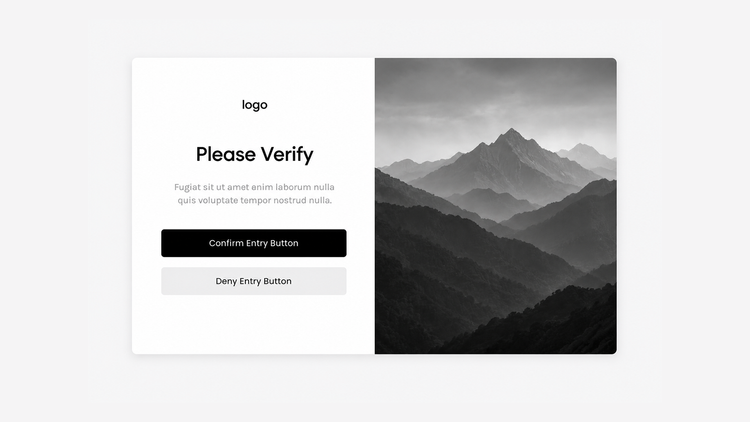
Verification Pop Up
This Super Plugin moved from our legacy site. If you previously purchased, to unlock.
The original library, featuring hundreds of copy-and-paste plugins for Squarespace. These legacy plugins are preserved as they were originally released and are available as-is. For no-code plugins with visual editing and live previews, explore the current plugin library.
Overview
Show a verification popup before visitors can browse your Squarespace site.
Works with Squarespace 7.0 and 7.1
Requires Core/Business Plan or Higher
Uses Custom CSS and Code Injection
Plugin Delivery
A classic Super Plugin from the original Ghost Plugins library. Purchase once to unlock the code on this page and use it on unlimited websites. Included with Ghost+.
Squarespace Compatibility & Requirements
Compatibility notes preserved from the original release.
Install Steps
Follow each step in order. Code boxes unlock after purchase, with Ghost+, or with your original password.
Step 1. Add this code to Header Code Injection
Unlock to view and copy the code.
Step 2 (a). Add this code to Footer Code Injection - For Squarespace 7.1
Unlock to view and copy the code.
Step 2 (b). Add this code to Footer Code Injection - For Squarespace 7.0
Unlock to view and copy the code.
Step 3. Add this code to Custom CSS
Unlock to view and copy the code.
Step 4 (a). Customizable Options - Footer Code Injection
These options are available in Footer Code Injection.
Title Text
Description Text
Confirm and Deny Button Text
Restricted Access Text
Logo (URL Link Required)
Image (URL Link Required)
Uploading Your Logo and Image: Use CSS > Manage Files to upload and generate a file URL link for your image and logo. Then replace IMAGE-URL-HERE with the file URL in the Code Injection option. [Learn more](https://support.squarespace.com/hc/en-us/articles/205813928-Uploading-and-managing-files)
Step 4 (b). Customizable Options - Custom CSS
These options are available in Custom CSS.
Overlay Background Color
Pop Up Background Color
Pop Up Width and Padding
Logo Size
Text Alignment
Title Text Size, Color, and Padding
Description Text Size, Color, and Padding
Button Text Size, Border Radius, and Padding
Confirm Button Text and Background Color
Deny Button Text and Background Color
FAQ
Answers to common questions about setup, customization, and troubleshooting.
How do I get the code?
Purchase the Unlimited License, use Ghost+, or enter the download password from your original legacy purchase. The code unlocks on this page.
Will it work on my Squarespace version?
Legacy plugins were built for the version noted in Squarespace Compatibility & Requirements and are provided as-is. Newer platform changes may require small tweaks.
Can I customize it?
Yes. Edit the values in Script Settings or override the selectors listed under Classes and Styling in your Custom CSS.
Do you support legacy plugins?
Legacy plugins are no longer updated. For maintained plugins with Plugin Studio and ongoing support, browse the current plugin library.
Changelog
A history of updates released for this plugin.
Original release
Archived exactly as it shipped in the original plugin library. No further updates are planned for legacy plugins.
Plugin Notes
As good practice, the pop up’s image will not display on mobile.
Troubleshooting (Plugin Not Working)
Pop up will remember the visitor’s “yes/confirm” answer by caching their response within their browser. This cannot be turned off.
If a “yes/confirm” answer has been previously selected, the pop up will no longer show since their answer has been confirmed.
Recommended
Want the current Ghost experience?
Explore the current plugin library for plugins with live previews, built-in customization options, Plugin Studio editing, easier installation, and ongoing updates designed for the latest Ghost experience.
Browse Current Plugins →