
Blog Post Banner Image
This Super Plugin moved from our legacy site. If you previously purchased, to unlock.
The original library, featuring hundreds of copy-and-paste plugins for Squarespace. These legacy plugins are preserved as they were originally released and are available as-is. For no-code plugins with visual editing and live previews, explore the current plugin library.
Overview
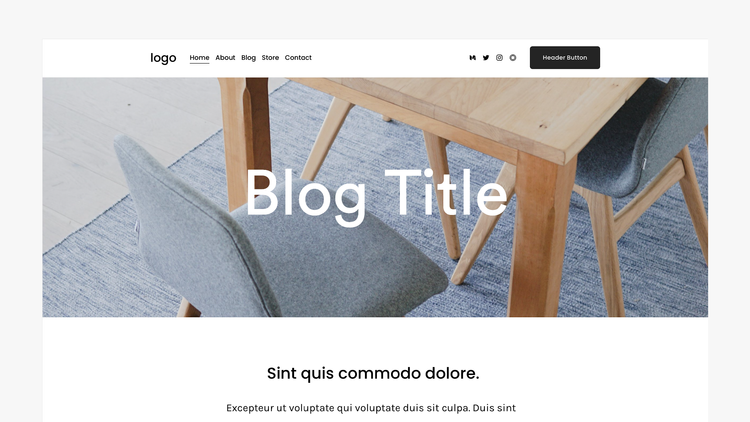
Add a banner image to Squarespace 7.1 blog posts.
Works with Squarespace 7.1
Requires Core/Business Plan or Higher
Uses CSS Editor and Code Injection
Plugin Delivery
A classic Super Plugin from the original Ghost Plugins library. Purchase once to unlock the code on this page and use it on unlimited websites. Included with Ghost+.
Squarespace Compatibility & Requirements
Compatibility notes preserved from the original release.
Install Steps
Follow each step in order. Code boxes unlock after purchase, with Ghost+, or with your original password.
Step 1. Upload Blog Post Thumbnail
Go to the blog post’s settings and upload an image to the post’s main thumbnail box. Be sure not to upload the image to the social image box by mistake.
Step 2. Add this code to Header Code Injection
Unlock to view and copy the code.
Step 3. Add this code to Footer Code Injection
Unlock to view and copy the code.
Step 4. Add this code to Custom CSS
Unlock to view and copy the code.
Step 5 (a). Customizable Options - Footer Code Ijnection
These options are available in Footer Code Injection.
Text Animation On Page Load (On or Off)
Step 5 (b). Customizable Options - Custom CSS
These options are available in Custom CSS.
Banner Height
Banner Overlay Color
Banner Text Size, Color, and Alignment
Banner Text Padding and Max Width
Banner Image Position
Zoom Animation On Page Load (Speed Timer, On or Off)
⚠️ Important Note - Double Title Text (This is Not a Bug)
You may see the blog post’s title twice while in edit mode – within the banner and below the banner.
The second title (below the banner) is the area where you can edit the title of the post. This is the only place Squarespace allows for editing this. Normal visitors will only see the title in the banner.
Plugin Notes
A blog post thumbnail image is required to be uploaded.
The banner image will be placed directly below the header. Due to Squarespace limitations, transparent header is not available.
Troubleshooting (Plugin Not Working)
Ensure the image has been added to the default thumbnail box and not to the social image box.
Recommended
Want the current Ghost experience?
Explore the current plugin library for plugins with live previews, built-in customization options, Plugin Studio editing, easier installation, and ongoing updates designed for the latest Ghost experience.
Browse Current Plugins →